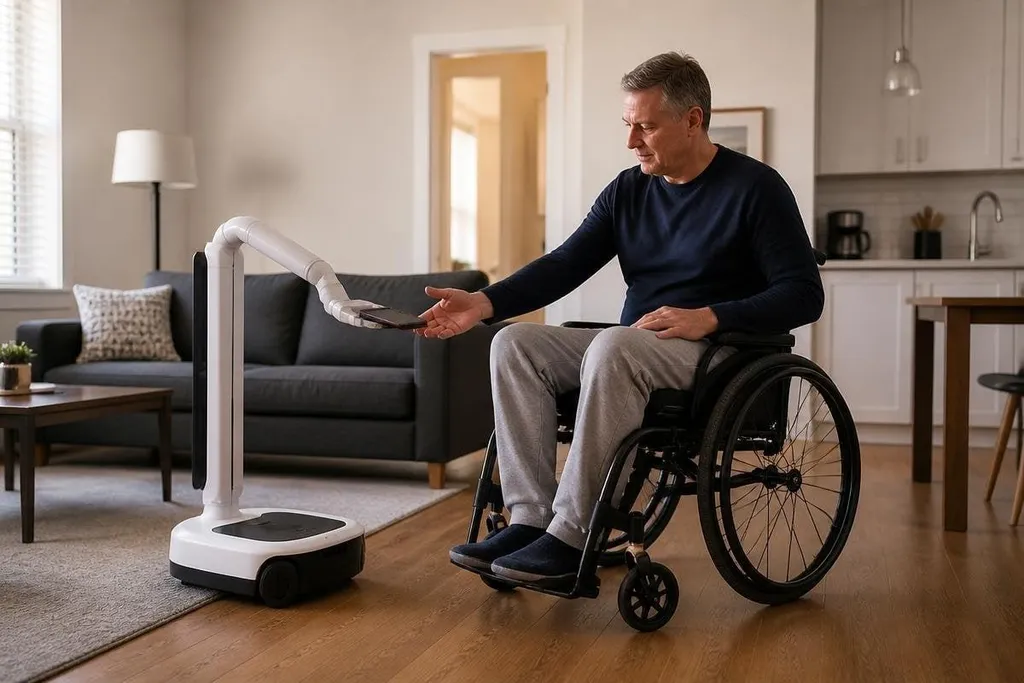
A robot that brings a dropped phone, opens a door, or steadies a meal tray could change a hard task into a manageable one. For a person with limited mobility, the useful question is not whether a robot looks human, but which task it can handle safely and repeatably.
- Mobile robots can carry items between rooms.
- Robotic arms can reach, grip, and move objects.
- Voice control and emergency stops matter as much as movement.
Start with the task, not the robot
Limited mobility covers many needs. Someone using a wheelchair may need help reaching a high shelf, while someone with weak grip strength may need help opening a bottle. A person recovering from surgery may need support for a short period, then use less help as their movement returns.
That difference changes the design. A mobile system for carrying laundry needs a mobile base, storage space, and safe movement around furniture. For feeding, the design needs a small arm, force sensors, and careful control near the face. One machine will rarely suit every person or room.
The first useful systems will probably handle a narrow group of tasks. That makes testing easier because engineers can measure the result: did the robot reach the table, grip the cup, and stop when a person touched its arm?
How the machines would work
A home robot needs several systems to work together. Cameras can help it identify a cup or phone. LiDAR, which measures distance with light, can help it build a map of the room.
A mobile base can then move across the floor while avoiding chairs, feet, and door frames. An arm needs a gripper suited to the object. A two-finger gripper may hold a box, while a soft gripper may be safer around food or skin. Force sensors let the robot detect resistance, so it can stop instead of continuing to squeeze.
Voice control may help someone who cannot reach a screen. It also creates a safety problem: the robot needs a clear way to confirm a command, cancel an action, and stop at once. A large physical stop button should remain easy to reach from a wheelchair or bed.
The person should stay in control. A robot can fetch a bottle, but the user should decide when it moves and where it places the bottle.
Where robots can help first
Simple support tasks have a better chance of working at home because they need less contact with the body. Carrying objects, picking items from a low table, opening powered doors, and bringing a phone are easier to define than helping someone stand.
Standing support is harder. A robot must handle body weight, changes in balance, uneven floors, and a person who may move without warning. A mistake during a transfer can cause injury, so this job needs tested hardware, trained setup, and a clear manual backup.
Rehabilitation is another area with a different goal. A robot may guide a repeated arm or leg motion while a therapist sets the exercise. The robot should record movement and resistance, but a clinician still needs to judge pain, fatigue, and progress.
A guided motion in a clinic doesn’t show whether a person can use the robot safely at home. Reports from Robot24 can tie each claim to the device, task, test setting, and human help still needed. Those details lead to the physical limits that shape daily use.
The limits that shape real use
Cost will affect access. A machine with an arm, sensors, a mobile base, and safety controls needs more hardware than a voice assistant. Repairs, charging, software updates, and home changes add to the cost after purchase.
Privacy also needs a clear answer. Cameras and microphones may record inside a private home. A buyer should know what the robot stores, where that data goes, and how to delete it.
Many homes are difficult for robots. Rugs, narrow doorways, stairs, pets, and clutter can block movement. A robot that works in a clear test room may need a different base, better sensing, or human help in an ordinary home.
I’d start with robots that fetch and carry, then judge more difficult jobs only after safety tests show they can stop and recover.
A practical buying and trial checklist
Before choosing a mobility robot, check these points:
- Name the task: Write down the exact action, such as carrying a drink from the kitchen to a bedside table.
- Check the room: Measure door widths, floor changes, turning space, and the height of the surfaces the robot must reach.
- Test control: Confirm that voice, buttons, or a phone interface work for the person who will use them.
- Check the stop system: Find the emergency stop and confirm it can be reached from the main chair, bed, or standing position.
- Ask about data: Get clear terms for camera footage, voice recordings, software updates, and deletion.
- Plan a fallback: Keep a manual way to complete the task when the robot is charging, blocked, or out of service.
The most useful mobility robot may begin with one modest job and do it safely every day. The open question is how many homes can support that machine without costly changes or constant human help.